
Caution: Beware of Deceptive Retirement Solicitations Targeting ACERA Members
Recently, ACERA members have reported receiving unsolicited emails with the subject line “Understanding Your Pension for Alameda County Personnel.” These communications are sent by third-party lead-generation firms not affiliated with ACERA or Alameda County. While these emails may appear official, they are marketing tools designed to gather your personal information for private financial services.
What the Deceptive Email Looks Like
For your reference, here’s an image of one of the emails currently circulating:
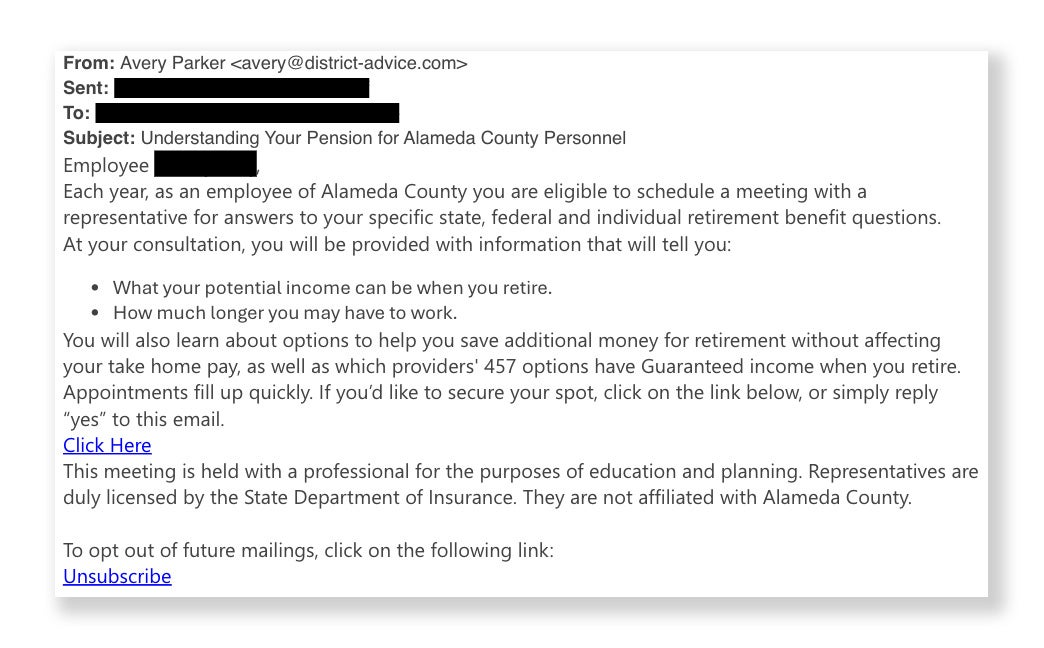
Some of the details to note:
- Subject: Understanding Your Pension for Alameda County Personnel
- Greeting: Often uses “Employee [Last Name]“
- The Lead: Claims you are “eligible to schedule a meeting… for answers to your specific state, federal and individual retirement benefit questions.”
- The Link: Directs you to a non-government website
Identifying Misleading Solicitations
ACERA wants to help you tell the difference between our official messages and unauthorized third-party solicitations. Here are some red flags:
- Inaccurate Claims of Eligibility: The email states that you are “eligible to schedule a meeting” each year. This phrasing is misleading. While you are always welcome to speak with ACERA staff, these third-party meetings are not an official part of your ACERA benefits or your employment requirements.
- The “Non-Affiliation” Disclaimer: These emails often include a small note stating that representatives are “not affiliated with Alameda County.” Legitimate retirement counseling for ACERA members is only provided by ACERA staff.
- Targeted Personal Data: These firms often use public employee directories to find your name and employer. Do not assume an email is official simply because it correctly identifies your workplace or job title.
- Unsolicited Meeting Links: Official ACERA webinars are either initiated by you at www.acera.org/seminars or via an email reminder sent directly from your employer (which will always feature the white ACERA logo in a blue bar). Once you sign up, you will receive a confirmation email directly from Zoom. For individual counseling, ACERA only provides Ready-to-Retire sessions for those within three months of retirement, which are initiated by the member on our website followed by a phone call from our staff. ACERA will never send an unsolicited link asking you to book a private appointment on an external website.
Other Ways to Identify Misleading or Scam Emails
In addition to the specific campaign above, phishing scams and fraudulent emails often share several common characteristics. Be on the lookout for these classic red flags:
- Fake Landing Pages: Fraudsters often create websites that look exactly like a legitimate organization’s login page or form. These pages are designed to trick you into entering your username, password, or financial details. Always check the website’s address (URL) in the browser bar before entering any information.
- Unexpected or Unsolicited Emails: Exercise extreme caution with any email you did not expect to receive. ACERA will not send you forms or requests for information out of the blue.
- Spoofed Sender Addresses: Fraudsters can make an email appear to come from a legitimate source. Always double-check the sender’s address for subtle misspellings or unusual domains.
- Grammar and Spelling Errors: While professional organizations strive for polished communications, scam emails are frequently riddled with typos, poor grammar, or awkward phrasing.
- Urgent Requests or Threats: Phishing scams often try to create an artificial sense of urgency—such as claiming your account is at risk—to pressure you into taking immediate action without thinking.
- Requests for Sensitive Information: Be suspicious of any email requesting your credentials, payment information, or other personal details. ACERA and other legitimate institutions will never ask for your password or Social Security number via email.
What Legitimate ACERA Emails Look Like (3 Types)
ACERA will send you 3 types of emails:
- Direct Correspondence From an ACERA Staff Member: These are sent from a member of our staff with an email address ending in @acera.org.
- News Emails: These emails start with the ACERA logo in a blue bar and feature a main image. They are sent from noreply@acera.org. All news items that go out over email are also posted at www.acera.org/news, so you can double check their legitimacy.
- Wellness Emails: These emails start with the ACERA Wellness logo in a navy blue bar and feature a main image. They are sent from noreply@acera.org. All wellness items that go out over email are also posted at www.acera.org/well, so you can double check their legitimacy.
What Legitimate Links in ACERA Emails Look Like
Legitimate links in ACERA emails will often point to http://acera.us3.list-manage.com, which allows us to statistically track clicks from our Mailchimp email application so we can understand how well our emails perform. Links provided in direct emails you receive from ACERA staff will point to expected websites, like web pages on ACERA’s website (www.acera.org/health) or other government agencies (www.medicare.gov or www.ssa.gov).
How to Safely Inspect Links in Emails
If you want to see where a link goes without risking your device’s safety, use a browser isolation tool like urlscan.io. This service visits the website for you and shows you a screenshot of the page, allowing you to verify the destination without any risk to your computer or network.
Step 1: Copy the Link Address
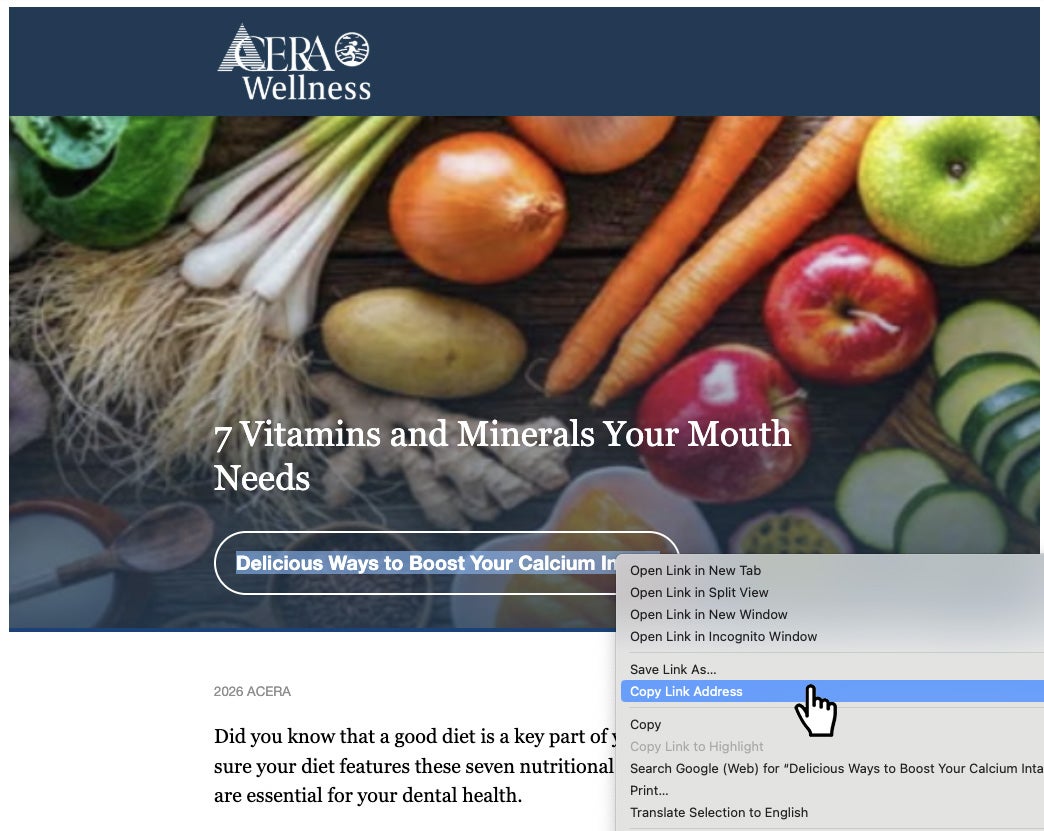
On a Computer: Right-click the link and select “Copy Link Address.” (You can also hover your pointer over a link to see a preview of the URL in the bottom corner of your browser window).
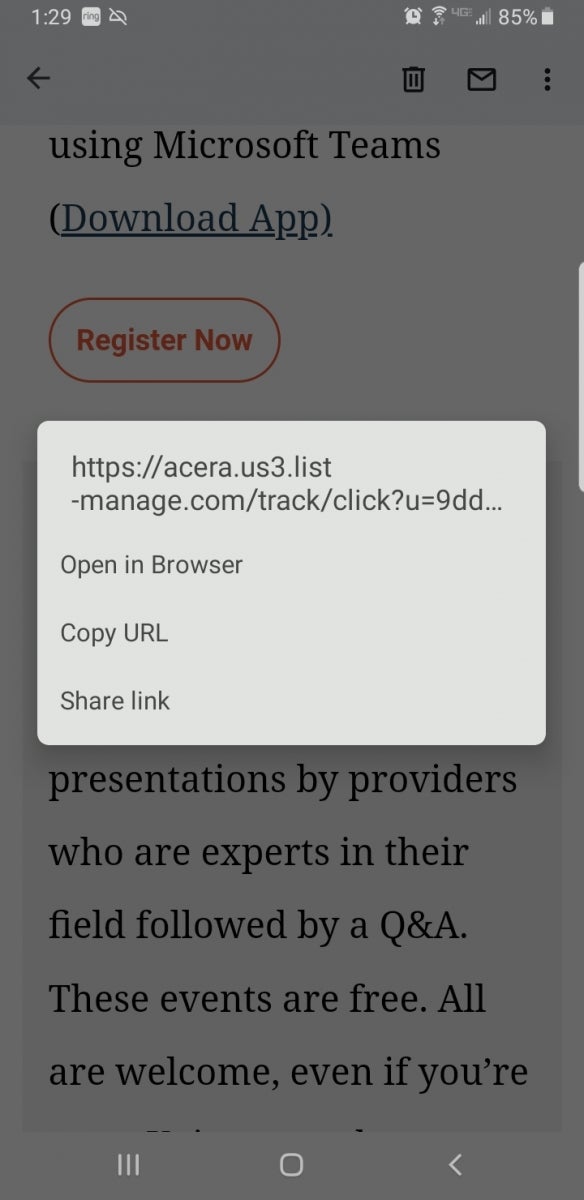
On a Smartphone: Long-press (press and hold) the link until a menu appears, then select “Copy Link Address” or “Copy URL.”
Step 2: Scan the Link
Go to urlscan.io, paste the address into the search field, and click the “Public Scan” button. The service will generate a safe “snapshot” of the website for you to review.
Avoid Clicking “Unsubscribe” on Suspicious Emails
We recommend avoiding clicking links or “unsubscribe” buttons in unsolicited emails entirely. Clicking these can confirm to the sender that your email address is active, which often leads to more solicitations.
What To Do if an Email Seems Suspicious
If you receive a retirement-related email that seems out of the ordinary:
- Do not click any links.
- Do not reply to the email.
- Call us directly at 510-628-3000 from 9:00 am to 4:30 pm on business days or email us to verify if a communication is official.
ACERA remains committed to protecting your privacy and ensuring you have access to accurate, official information regarding your retirement.